Tech · 2 min read
Airflow on Windows WSL2 with Docker: the 5 errors I hit, and the fix for each
Five errors from my own Airflow 3 setup on Windows 11, copied from my screen, each with its cause and the fix that worked.
In short: I built a small weather pipeline with Apache Airflow 3 (Astro CLI), Docker Desktop and PostgreSQL inside WSL2 on Windows 11. It broke five times before the first green run. Each error below is copied from my screen, with what caused it and the fix that worked.
My setup: Windows 11, WSL2 (Ubuntu), Docker Desktop with the WSL2 backend, Astro CLI, Astro Runtime 3.3 (Airflow 3), and a second PostgreSQL 16 for the data.
1. "curl: (6) Could not resolve host: install.astronomer.io"
Cause: DNS inside WSL was broken, not the internet. ping 8.8.8.8 came back fine, so the connection worked; only names didn't resolve. /etc/resolv.conf pointed to /mnt/wsl/resolv.conf, whose nameserver was 10.255.255.254, and that relay stopped answering after Docker Desktop started.
What didn't work: writing nameserver 8.8.8.8 into /etc/resolv.conf. It worked until the next reboot, when WSL wrote the old file back.
Fix that lasted:
echo -e "[network]\ngenerateResolvConf = false" | sudo tee /etc/wsl.conf
sudo rm /etc/resolv.conf
echo "nameserver 8.8.8.8" | sudo tee /etc/resolv.conf
echo "nameserver 1.1.1.1" | sudo tee -a /etc/resolv.conf
Then restart WSL (wsl --shutdown in PowerShell) and open Ubuntu again.
Careful: on an office network or a VPN, public DNS may not see the company's internal names. There, use the nameserver your network gives you instead of 8.8.8.8.
2. "ports are not available: exposing port TCP 127.0.0.1:5432"
Cause: port 5432 was already taken by PostgreSQL installed on Windows itself (postgresql-x64-16). astro dev start wants 5432 for Airflow's own database.
How to see it (PowerShell as Administrator):
Get-NetTCPConnection -LocalPort 5432Fix: move Airflow's database to another port instead of stopping the Windows one:
astro config set postgres.port 5435
astro dev start
Airflow then opened at http://localhost:8080.
3. "Dag Import Error (1)" and "No module named 'airflow.providers.http'"
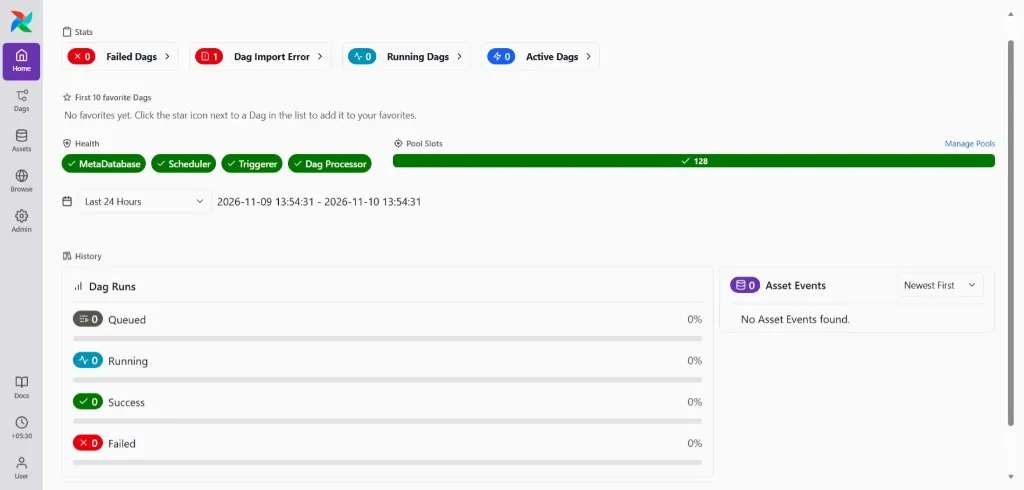
Cause: Airflow 3 doesn't come with the HTTP and Postgres providers in my image. The same missing packages also hide HTTP and Postgres from the connection type list (mine only showed Elasticsearch).
What didn't work: pip install inside the running container. The change is gone when the container restarts.
Fix: add them to requirements.txt in the project folder, then astro dev restart:
apache-airflow-providers-http
apache-airflow-providers-postgres
The import error went away and both connection types appeared.
4. Old tutorial code on Airflow 3
I followed a two-year-old tutorial. On Airflow 3, days_ago and schedule_interval didn't work; the code needs datetime and schedule. Airflow's upgrade page also moves the imports to airflow.sdk (the old paths still work for now, with a warning), and catchup is now off by default.
My pipeline with the Airflow 3 imports:
from datetime import datetime
from airflow.sdk import DAG, task
from airflow.providers.http.hooks.http import HttpHook
from airflow.providers.postgres.hooks.postgres import PostgresHook
LATITUDE = "51.5074"
LONGITUDE = "-0.1278"
POSTGRES_CONN_ID = "postgres_id"
API_CONN_ID = "open_meteo_id"
with DAG(
dag_id="weather_etl_pipeline",
start_date=datetime(2024, 1, 1),
schedule="@daily",
catchup=False, # already the default in Airflow 3; written out so it's clear
):
@task()
def extract_weather_data():
http_hook = HttpHook(http_conn_id=API_CONN_ID, method="GET")
endpoint = f"/v1/forecast?latitude={LATITUDE}&longitude={LONGITUDE}¤t_weather=true"
response = http_hook.run(endpoint)
if response.status_code != 200:
raise Exception(f"Failed to fetch weather data: {response.status_code}")
return response.json()
@task()
def transform_weather_data(weather_data):
current = weather_data["current_weather"]
return {
"latitude": LATITUDE,
"longitude": LONGITUDE,
"temperature": current["temperature"],
"windspeed": current["windspeed"],
"winddirection": current["winddirection"],
"weathercode": current["weathercode"],
}
@task()
def load_weather_data(row):
pg_hook = PostgresHook(postgres_conn_id=POSTGRES_CONN_ID)
conn = pg_hook.get_conn()
cursor = conn.cursor()
cursor.execute("""
CREATE TABLE IF NOT EXISTS weather_data(
latitude FLOAT, longitude FLOAT, temperature FLOAT,
windspeed FLOAT, winddirection FLOAT, weathercode INT,
timestamp TIMESTAMP DEFAULT CURRENT_TIMESTAMP
);
""")
cursor.execute(
"""INSERT INTO weather_data(latitude, longitude, temperature, windspeed, winddirection, weathercode)
VALUES (%s, %s, %s, %s, %s, %s)""",
(row["latitude"], row["longitude"], row["temperature"],
row["windspeed"], row["winddirection"], row["weathercode"]),
)
conn.commit()
cursor.close()
load_weather_data(transform_weather_data(extract_weather_data()))Two notes: the values go in with %s placeholders, not an f-string, so an apostrophe in the data can't break the SQL. And each run adds one new row, which is what I want for a weather log; running the same day twice gives two rows.
5. "psycopg2.OperationalError: connection to server at "172.18.0.2", port 5432 failed: Connection refused"
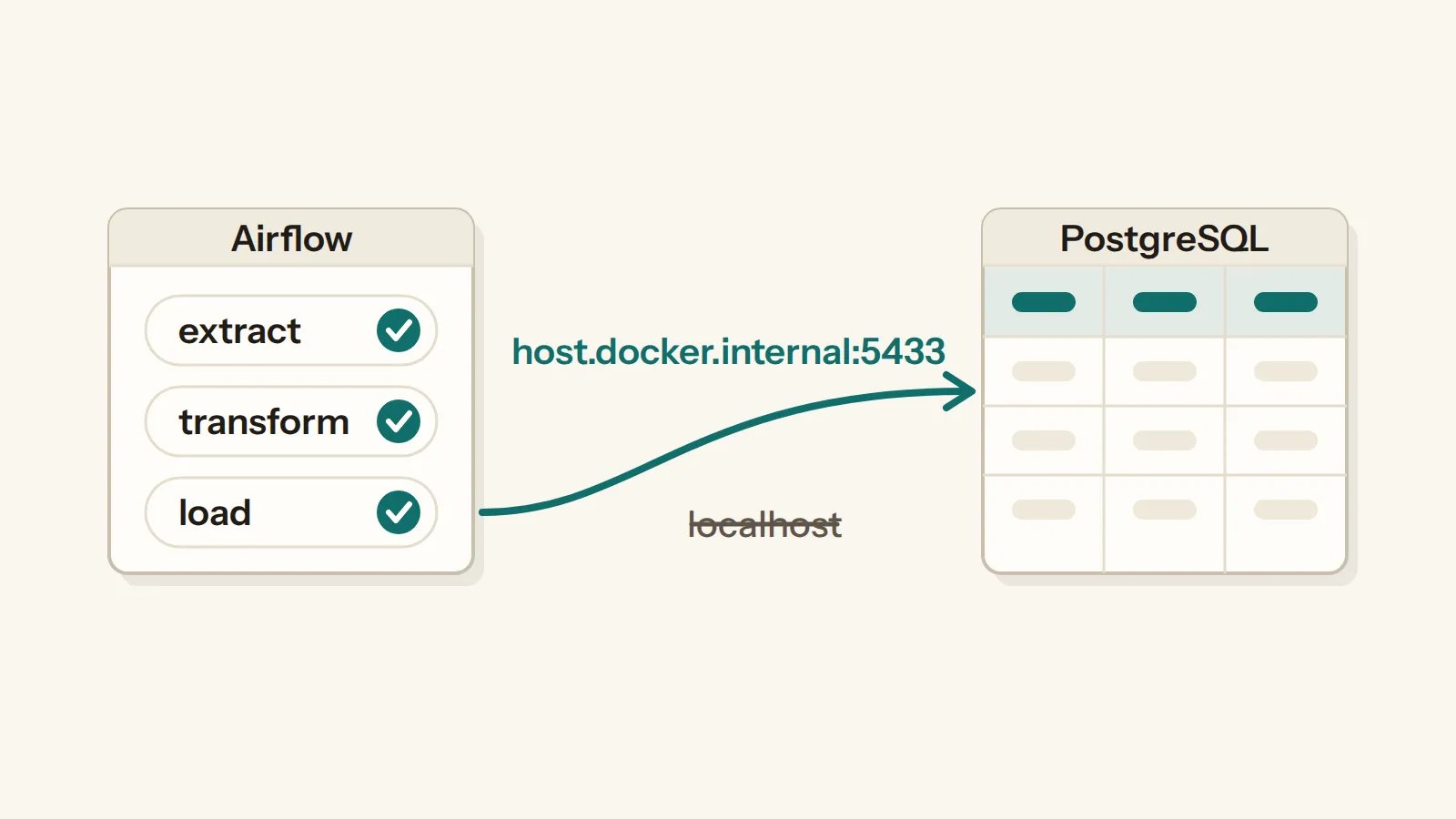
Cause: inside a Docker container, localhost is the container itself, not my laptop. My data database runs in its own container (postgres_db, from my own docker-compose.yml) and is published on my laptop at port 5433. With Host localhost, Airflow looked inside its own container; with Host postgres, it reached Airflow's own database instead (172.18.0.2).
Fix: in Airflow, Admin → Connections → postgres_id:
- Host:
host.docker.internal - Port:
5433 - Database:
postgres, Login:postgres, Password: your local one
host.docker.internal is Docker Desktop's name for the laptop, seen from inside a container.
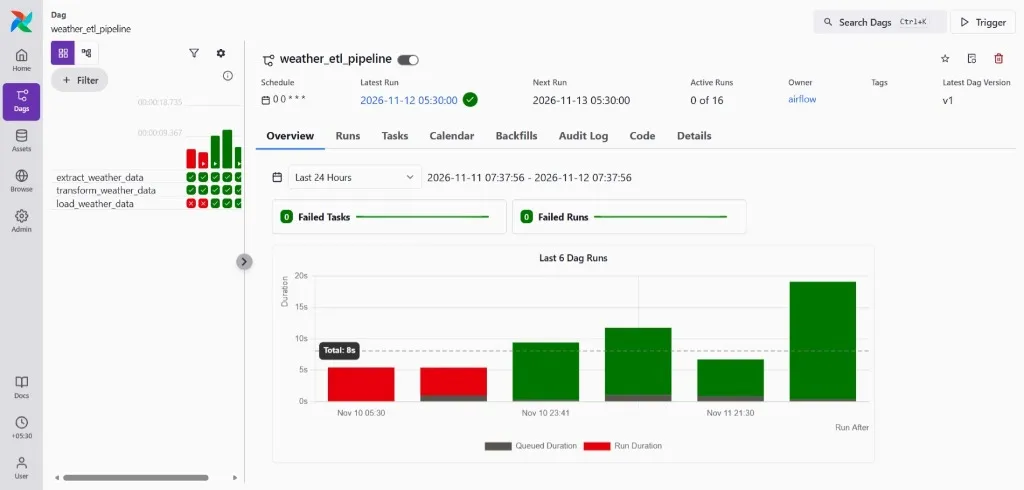
After that change the next runs went green: extract, transform and load all succeeded, each run finishing in under 20 seconds.
Why two databases
Airflow's own PostgreSQL (port 5435 for me) keeps Airflow's records: runs, task states, logs. My weather rows go to a separate PostgreSQL 16 (port 5433), so a heavy query on the data can't slow Airflow down. The data survives a reboot because the compose file keeps it in a Docker volume (postgres_data).
Checking the data arrived
In DBeaver, connected to localhost:5433:
SELECT latitude, longitude, temperature, windspeed, winddirection, weathercode, timestamp
FROM weather_data
ORDER BY timestamp DESC
LIMIT 5;
My first row: London, 10.1 °C, wind 17.6 km/h, saved at 2026-11-10 18:11.
Tags: airflow · docker · wsl2