Systems · Lesson · ~16 min · 5 tasks
SQL GROUP BY and HAVING, one pile at a time
Someone on Reddit asked why every column they selected also had to go into GROUP BY, and why they could not simply group by one column. This page builds the groups one pile at a time, and it ends with the answer to that question.
By the end: know which columns a grouped query may select, and why · Nothing to install
In this lesson · 11 parts
They were working in AWS Redshift, and their example selected a name, a date and an age, then grouped by all three. Here is what happens when you group by one column and select another one anyway, on a small table of employees: each department's average salary, with a first name beside it. Run it, then read the first row as a sentence.
Run it before you read on.
6 rows, and the first one reads like "Amit, 101000". But Amit earns 120000. The 101000 is the average of department 1, all of it, and Amit is just one of the four people in that department. SQLite ran the query without a word of warning, and a stricter database would have refused it. This page is about why.
The one idea: one row per pile
GROUP BY deals the rows into piles. Every row with the same value in the GROUP BY columns goes into the same pile, and the result has one row for each pile. An aggregate such as COUNT or AVG then answers once per pile instead of once for the whole table.
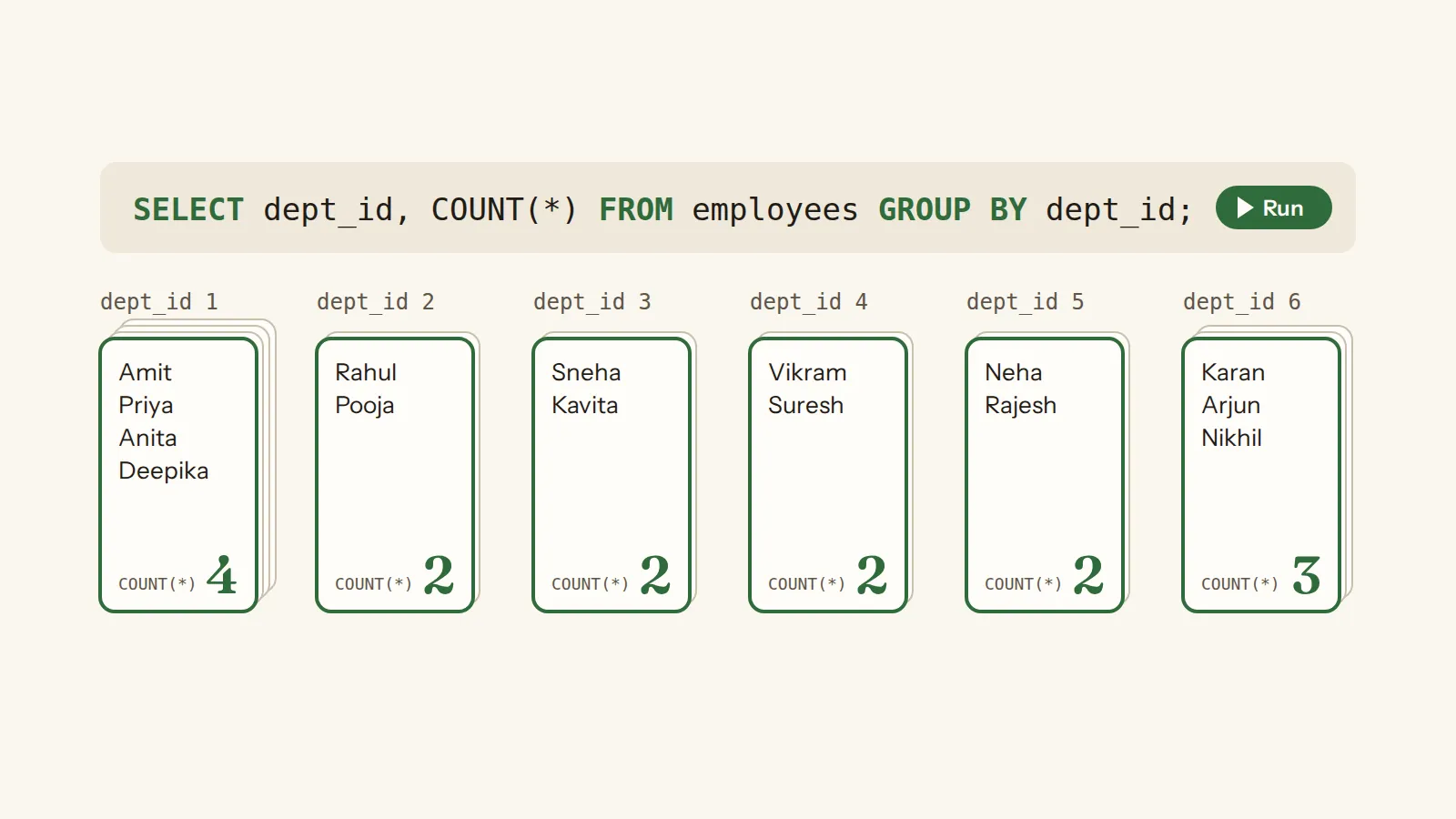
Picture the employee table as a deck of cards, one card per person, dealt into piles by department. The department number is the same on every card in a pile, so the pile can show it. COUNT can count the cards in a pile and AVG can average the salaries written on them. But a first name is different on every card, and a pile has no single first name to show, which is the whole lesson in one picture.
Counting the piles
Start with the simplest grouped question: how many people work in each department.
6 rows: department 1 has 4 people, department 6 has 3, and departments 2, 3, 4 and 5 have 2 each, which adds up to all 15. Legal, department 7, gets no row at all: nobody works there, so there is nothing to put in its pile.
To see who is in each pile, GROUP_CONCAT joins the values of a column into one string, with the separator you give it, and leaves out the empty ones. The order inside the string is not promised unless you ask for one.
6 rows, and every name is now on show: department 1 is Amit, Priya, Anita and Deepika, and department 6 is Karan, Arjun and Nikhil. The first query showed one name per pile because it had room for only one.
Which columns a grouped query may select
A grouped query can show two kinds of column safely. A column named in GROUP BY has one value per pile, because that value is what made
the pile. An aggregate boils the pile down to one value. Any other column, like first_name in the first query, has many
values in a pile and no rule for choosing one.
SQLite calls that a bare column, and fills it from one of the rows in the pile. Which row is usually not known, so in many cases its value is undefined, and the row chosen can change from one run to the next. There is one exception: when the query has exactly one MIN or MAX, a bare column comes from the row that holds that minimum or maximum, and on a tie from any of those rows.
PostgreSQL refuses the query instead. In its rules, a column in the select list must be in GROUP BY, because there is no single value of it for each group. Some MySQL setups run such a query and take the extra column from any row of the group, which can give wrong results without an error.
In a query with GROUP BY dept_id, which columns can you select as they are, with no aggregate around them?
A column in GROUP BY has one value per pile, and an aggregate turns a pile into one value; any other column has several values in a pile.
The NULL pile
Empty cells get a pile of their own. When rows are grouped, NULLs count as equal, so every row with an empty value in the GROUP BY column lands in one pile. Grouping treats empty cells differently from the comparisons in the WHERE lesson.
Six people have no manager_id, and the others report to six different managers. How many rows does
GROUP BY manager_id give?
Six different managers give six piles, and the six people with no manager on file make a seventh, because NULLs count as equal when rows are grouped.
7 rows, and the biggest pile is the NULL one, with 6: everyone who reports to nobody, together.
Averages per pile
Each pile works out its aggregates on its own rows, and the empty salaries are left out pile by pile, as in the aggregates lesson. So it is worth showing how many values each average stands on.
6 rows. Department 3 has 2 people but only 1 salary on file, so its average, 97000, is that one salary. Departments 1 and 6 are a salary short as well, with 3 salaries for 4 people and 2 for 3.
ROUND tidies an average: ROUND(AVG(salary), 2) keeps two digits after the decimal point.
Filtering piles: HAVING
Now keep only the bigger departments. The obvious try puts the count in a WHERE. It is meant to fail, so run it and read the message.
An error: misuse of aggregate: COUNT(). WHERE looks at one row at a time, before any pile exists, so there is nothing yet for COUNT to count.
HAVING is the filter for piles. It runs after the grouping, once per pile, and a pile whose test is false is dropped, so it can use COUNT and the other aggregates.
2 rows: department 1 with 4 people and department 6 with 3.
HAVING can even test an aggregate you do not select.
3 rows: departments 1, 4 and 6, the ones whose average salary is over 100,000.
WHERE and HAVING in one query
The two are not rivals, because they filter different things at different times. WHERE filters rows before the piles are made, and HAVING filters whole piles after. Run both of these and compare department 1.
112500 for department 1: the WHERE dropped the 78000 salary before the pile was made, so the average is of the two salaries left.
101000 for department 1, its full average, and all six piles stay, because every department's average is at least 90,000.
That is also the order SQLite works in: first FROM, then WHERE on the rows, then GROUP BY makes the piles, HAVING drops the piles that fail, and only then come the result columns, DISTINCT, ORDER BY and LIMIT. It is not the order a query is written in.
You want only the departments with more than two people. Which clause can test COUNT(*)?
WHERE runs on single rows before any group exists, so it cannot use an aggregate; HAVING runs once per group, after the grouping.
A pile that does not exist
Legal, department 7, has nobody in it. Ask for its pile.
Nothing, not even a row with 0. Without the GROUP BY, the same COUNT(*) gives one row holding 0, because an aggregate query with no GROUP BY always returns exactly one row. With GROUP BY there is no pile, so there is no row.
Listing Legal with a count of 0 needs the departments table in front, joined to the employees, which is what the JOINs lesson is about.
Back to the question: why every selected column
Now the Reddit question has its answer. Every column you select needs one value per pile. A column in GROUP BY has one, and an aggregate makes one. Any other column has several, so a strict database refuses the query, and SQLite quietly picks one, which is how a department's average ended up next to Amit's name.
So a column added to GROUP BY is a choice about the result, never a mere fix for an error message: every extra column cuts the piles smaller, and each result row then stands for a smaller pile. Choose what one row should stand for before you write the GROUP BY. Here the six department piles become twelve, one for each department and manager pair.
12 rows: each department is split by who the people report to, and in every department the one person with an empty manager_id sits in a pile of their own.
PostgreSQL has one more rule worth knowing: when you group by a table's primary key, it lets you select that table's other columns too, because each key has exactly one row's worth of them, so there is no doubt about which value to show.
Your turn
There are five tasks below, all on the same table. Write the query, run it, and the page tells you how it is wrong: too many groups, too few, or the right number with the wrong numbers in them. The order of the rows does not matter in these five.
employees: emp_id · first_name · last_name · email · hire_date · dept_id · manager_id · salary
All five. You counted and averaged per pile, kept the empty managers in a pile of their own, and filtered piles with HAVING, before and after a WHERE.
Test yourself
SELECT dept_id, first_name, COUNT(*) FROM employees GROUP BY dept_id; What does first_name show in SQLite?
first_name is neither in GROUP BY nor inside an aggregate, so SQLite fills it from one of the rows in each pile, and which row is usually not known.
You want only the departments whose average salary is over 100,000. Where does the test go?
The test is on each department's average, which exists only once the rows are grouped, so it belongs in HAVING.
Done. This lesson is ticked off on the path, and the questions you answered are now in your review deck.
group
The set of rows one aggregate answers for; without GROUP BY the whole result is one group, and "The count(*) function (with no arguments) returns the total number of rows in the group."
Source: sqlite.org ↗ · checked 13 Oct 2026
column
One named field that every row of a table has; a column definition "consists of the name of the column, optionally followed by the declared type of the column".
Source: sqlite.org ↗ · checked 13 Oct 2026
table
A named set of rows that all have the same columns; CREATE TABLE "is used to create a new table in an SQLite database" and names "each column in the table".
Source: sqlite.org ↗ · checked 13 Oct 2026
row
One record of a table or of a result; "The result of a SELECT is zero or more rows of data where each row has a fixed number of columns."
Source: sqlite.org ↗ · checked 13 Oct 2026
query
A question put to the database in SQL; a SELECT is the kind that only reads, since "A SELECT statement does not make any changes to the database."
Source: sqlite.org ↗ · checked 13 Oct 2026
aggregate
A function that answers for many rows with one value, like COUNT, SUM, AVG, MIN or MAX; every one of them except COUNT(*) skips empty cells.
Source: sqlite.org ↗ · checked 13 Oct 2026
COUNT
How many; COUNT(*) counts rows, while COUNT(column) "returns a count of the number of times that X is not NULL in a group".
Source: sqlite.org ↗ · checked 13 Oct 2026
AVG
"the average value of all non-NULL X within a group", so an empty cell is left out of both the total and the count it divides by.
Source: sqlite.org ↗ · checked 13 Oct 2026
comparison
A test between two values with =, !=, <, > and the like; it answers true or false, and NULL when either side is empty.
Source: sqlite.org ↗ · checked 13 Oct 2026
WHERE
The clause that keeps only the rows whose test comes out true; a row whose test is false, or unknown because a cell is empty, is dropped without a message.
Source: sqlite.org ↗ · checked 13 Oct 2026
NULL
A missing value, not zero and not an empty string; in comparisons it "is considered less than any other value (including another value with storage class NULL)".
Source: sqlite.org ↗ · checked 13 Oct 2026
FROM
The clause that names the table or tables the query reads; "the data on which a simple SELECT query operates comes from the one or more tables or subqueries … specified following the FROM keyword".
Source: sqlite.org ↗ · checked 13 Oct 2026
DISTINCT
A word after SELECT that removes duplicate rows from the result: "duplicate rows are removed from the set of result rows".
Source: sqlite.org ↗ · checked 13 Oct 2026
ORDER BY
The clause that decides the order of the rows; without it "the order in which the rows are returned is undefined". ASC is the default and NULLs come first in it.
Source: sqlite.org ↗ · checked 13 Oct 2026
LIMIT
The clause that keeps only the first N rows of the sorted result; when there are fewer than N rows, all of them come back.
Source: sqlite.org ↗ · checked 13 Oct 2026
clause
One part of a query that does one job; a simple SELECT runs "FROM clause processing", then "WHERE clause processing", then the result columns, then ORDER BY and LIMIT.
Source: sqlite.org ↗ · checked 13 Oct 2026
GROUP BY
The clause that deals rows into groups, one group per distinct set of values of the listed columns or expressions, so that each aggregate answers once per group; "For the purposes of grouping rows, NULL values are considered equal."
Source: sqlite.org ↗ · checked 13 Oct 2026
SUM
The total of the values that are there; "If there are no non-NULL input rows then sum() returns NULL", because "the SQL standard requires it".
Source: sqlite.org ↗ · checked 13 Oct 2026