Systems · Lesson · ~17 min · 5 tasks
The SQL SELECT statement, step by step
Someone on Reddit needed the 100 newest rows of a table, shown oldest first, and their query gave them the newest first. This page goes through a SELECT one clause at a time, and it ends with the query that does both.
By the end: read a SELECT and know what it returns before you run it · Nothing to install
- The one idea: a SELECT asks, and only reads
- The table you are reading: SELECT *
- Name the columns you want
- A typo that runs without an error
- Each value once: DISTINCT
- Sorting: ORDER BY
- Keeping the first few rows: LIMIT
- The order SQLite works in
- What the question says, and what the query says
- Back to the question: newest rows, shown oldest first
- Your turn
- Test yourself
In this lesson · 12 parts
The rows were for a chart, which needed them oldest first, and the asker said they only knew the basics of SQL. Their query started with
SELECT TOP 100 and ended with ORDER BY pid DESC. TOP is how SQL Server keeps the first rows, and
SQLite, the database that runs every example on this page, writes LIMIT at the end instead. Here is the same problem on a
small table of employees: the three most recent hires.
Run it before you read on.
3 rows, newest first: Kavita, then Arjun, then Deepika. They are the right three people, in the order the Reddit asker did not want. One sort can choose the newest rows, or it can show rows oldest first, and by the end of this page you will write the query that does both.
The one idea: a SELECT asks, and only reads
Everything on this page is one kind of statement. A SELECT asks a table a question, and the answer comes back as rows: none, one or many, each with the same columns. And a SELECT only reads, it changes nothing in the database, so you can run anything below as often as you like, and the table stays as it was.
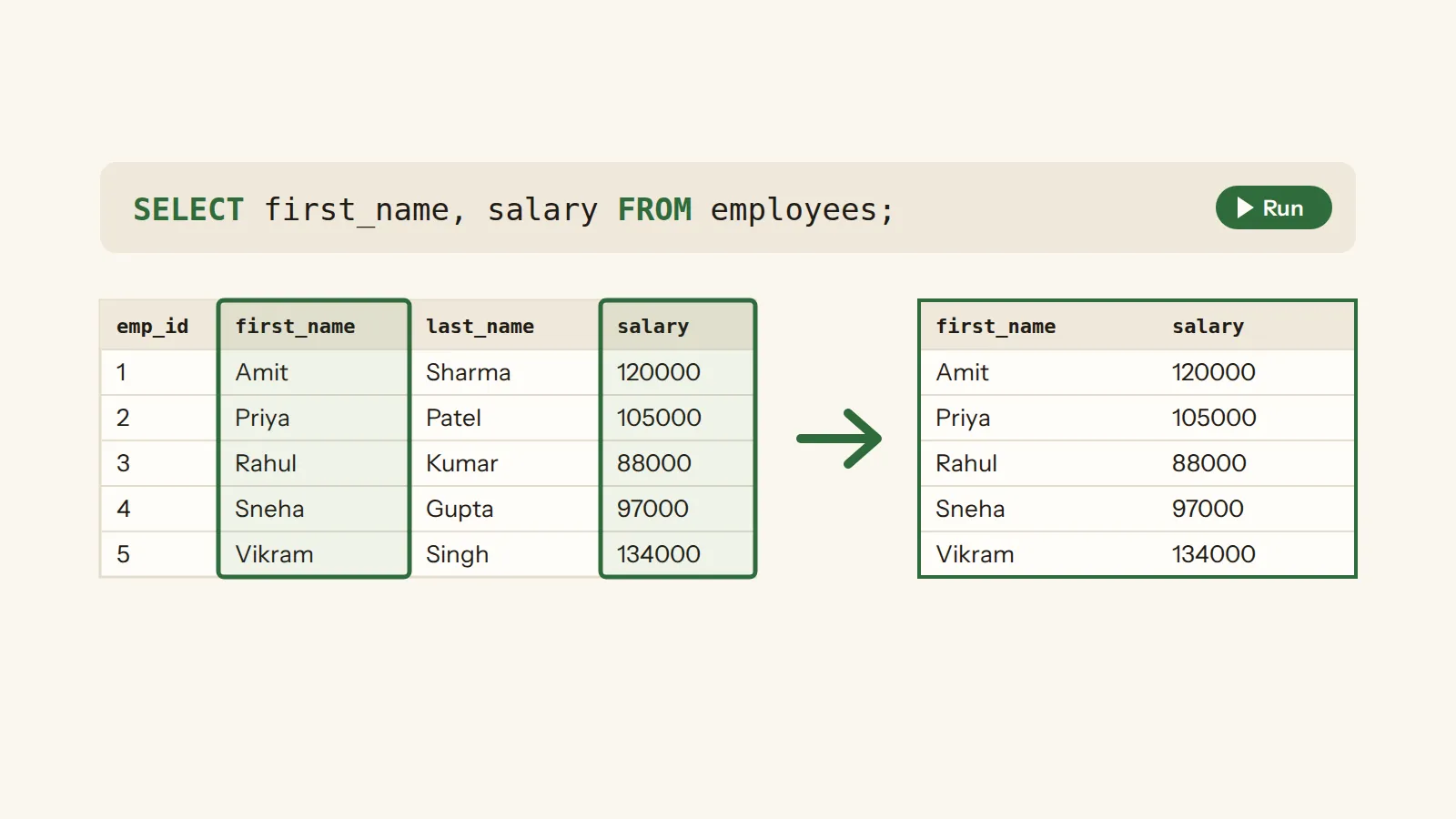
Picture the table as one tab of a spreadsheet, and a SELECT as instructions for making a copy of it. FROM names the tab. The list right after SELECT says which columns go into the copy. ORDER BY says how to sort the copy, and LIMIT says how many of its rows to keep. The tab itself never changes, and you only ever get a copy back.
The table you are reading: SELECT *
Every SQL lesson here queries the same small company, so the only new thing on each page is the idea. Run this to see all of it. The star after SELECT stands for every column.
15 rows, each with the same 8 columns. Look at manager_id and salary: some cells are empty.
An empty cell is NULL, a missing value rather than a zero, and it comes back later on this page.
The star is quick, and it raises a fair question: should you take every column, or name the ones you need? For a first look at a small table like this one, the star is fine. For a query you keep, and above all one that goes into an application, name the columns, which is the next step.
Name the columns you want
Put the column names after SELECT, with commas between them. Then only those come back, in the order you wrote them.
15 rows again, now with 3 columns, in the order you listed them.
You can also rename a column on the way out with AS. The new name is called an alias. It changes the heading of the result,
and nothing in the table.
A typo that runs without an error
Now break it on purpose. The query below has a typo in the column name, and the name is in double quotes. Guess what comes back, then run it.
15 rows, and every one of them says first_nme. SQLite read the misspelled name in double quotes as a piece of text, printed that text once per row, and raised no error.
SQLite lists this among its quirks. A misspelled name in double quotes is read as a piece of text instead of raising an error, and the habit it teaches people new to SQL, using double quotes for text, is a bad one. So in SQLite, single quotes are for text, and double quotes are for names like columns.
Why does it run at all? SQLite was first built to accept doubtful input and do its best with it, an idea that used to be considered good design. It means a wrong query can give you a wrong answer and no warning, so the habit worth building is to guess the result before you press Run.
SELECT "salry" FROM employees; has a typo inside double quotes. What do you get in SQLite?
A misspelled name in double quotes is read as a string literal, so SQLite prints that text once per row and raises no error.
Each value once: DISTINCT
Some columns repeat. dept_id has the same few numbers again and again. Put DISTINCT right after SELECT, and the repeated rows
are removed from the result.
6 rows, one for each department that has someone in it. Look at the order too: 6 comes before 5. Nothing in the query asked for an order, so none was promised, and that is the next section.
Sorting: ORDER BY
Without ORDER BY, SQLite promises no order at all: a query that returns more than one row can return them in any order, so which rows you see first depends on whether you wrote ORDER BY.
ORDER BY names the column to sort by. Ascending, ASC, is the default, so you only write DESC when you want the
biggest or the newest first.
15 rows, from Suresh, hired 2017-05-18, to Kavita, hired 2023-08-10. SQLite has no DATETIME datatype, so these dates are stored as text, written year first, and sorting that text puts them in time order, as the run shows.
The direction is where a quick reading goes wrong. A question like "who has been here longest" talks about the longest time, and the
longest time belongs to the earliest date, so the query sorts hire_date ascending.
My note: I read 'longest' and wrote DESC without thinking about which column I was sorting
Which ORDER BY puts the person who has been here longest first?
The person who has been here longest has the earliest hire date, and ascending order, the default, puts the earliest date first.
Empty cells have to go somewhere in a sort. Sort by salary and see where the people with no salary on file land.
Empty salaries come first: Arjun, Deepika and Kavita, and then everyone else from the lowest salary up. In an ascending sort the NULLs come first, and in a descending one they come last.
SQLite counts NULL as smaller than any other value, which is why it leads an ascending sort. To put the empty cells somewhere else, write
ASC NULLS LAST or DESC NULLS FIRST.
ORDER BY salary, with no direction written. Where do the empty salaries go?
Ascending is the default, and in an ascending sort the NULLs come first.
SQLite also accepts a number after ORDER BY: ORDER BY 2 sorts by the second column of the result, counting from the left. So
this sorts by the salary, from the top.
Keeping the first few rows: LIMIT
LIMIT goes at the very end and keeps only the first N rows of the result. Without an ORDER BY the order is undefined, so the first N rows could be any N rows. With one, they are the N rows you sorted to the top.
5 rows: the five people who have been here longest, Suresh first.
Ask for more rows than there are, and you simply get them all.
15 rows, all of them, and no error.
This is the spot where the Reddit query and SQLite spell things differently. In SQL Server, TOP with an ORDER BY keeps the
first n rows of the sorted result, so TOP 100 at the start there and LIMIT 100 at the end here do the same job.
The order SQLite works in
You write a SELECT in one order, and SQLite works through it in another. For a simple SELECT it first works out the input data from FROM, then filters it with WHERE, then builds the result columns, removing repeated rows for a SELECT DISTINCT, and only after that comes the ORDER BY and the LIMIT.
FROM: which table the rows come from.WHERE: which rows stay. It has its own lesson next.- The list after
SELECT, withDISTINCTif it is there. ORDER BY: the sort.LIMIT: how many rows of the sorted result to keep.
That order explains two things. An alias made in the column list can be used in ORDER BY, because the column list is done by the time the sort happens. And LIMIT keeps the first rows of the sorted result, because it comes last. The query below uses both.
FROM comes first, and it can even be left out. Then the input is a single row with no columns, so a SELECT on its own works like a calculator.
One row, holding 5.
Which part of a SELECT does SQLite work on first?
For a simple SELECT, SQLite works out the input data from FROM before anything else happens.
What the question says, and what the query says
Reading a query before you run it also means reading it the way SQLite will, word by word. In plain words, "the people in department 1 and department 2" means the people in both departments. To SQL, a row is kept only if it matches the entire WHERE condition. Read the query below as SQLite does, one row at a time, and guess the answer before you run it.
Nothing. No single row has dept_id 1 and dept_id 2 at the same time, and the row is kept only
if it matches the entire condition. Change AND to OR and run it again to get both departments.
Back to the question: newest rows, shown oldest first
Now the Reddit problem has every piece it needs. ORDER BY with DESC and a LIMIT pick the three newest hires. Then a second SELECT sorts those three the other way: put a SELECT in brackets after FROM, and the outer SELECT works on its result.
3 rows, oldest first: Deepika, Arjun, Kavita. The inner query chose the people, and the outer one chose the order.
That is the answer the asker got on the thread: a query in brackets, or a CTE, which is another way to write the same thing and has its own lesson further down the path.
Your turn
There are five tasks below, all on the same table. Write the query, run it, and the page tells you how it is wrong: too many rows, too few, or the right rows in the wrong order.
employees: emp_id · first_name · last_name · email · hire_date · dept_id · manager_id · salary
All five. You picked columns, sorted both ways, kept the first few, and wrote the Reddit query yourself.
Test yourself
The table has 15 rows. What does LIMIT 20 return?
If the SELECT would return fewer than N rows without a LIMIT, the entire result set is returned.
A query has LIMIT 3 and no ORDER BY. Which three rows come back?
Without an ORDER BY, the order in which the rows are returned is undefined, so the first three could be any three.
Done. This lesson is ticked off on the path, and the questions you answered are now in your review deck.
WHERE
The clause that keeps only the rows whose test comes out true; a row whose test is false, or unknown because a cell is empty, is dropped without a message.
Source: sqlite.org ↗ · checked 13 Oct 2026
clause
One part of a query that does one job; a simple SELECT runs "FROM clause processing", then "WHERE clause processing", then the result columns, then ORDER BY and LIMIT.
Source: sqlite.org ↗ · checked 13 Oct 2026
row
One record of a table or of a result; "The result of a SELECT is zero or more rows of data where each row has a fixed number of columns."
Source: sqlite.org ↗ · checked 13 Oct 2026
query
A question put to the database in SQL; a SELECT is the kind that only reads, since "A SELECT statement does not make any changes to the database."
Source: sqlite.org ↗ · checked 13 Oct 2026
FROM
The clause that names the table or tables the query reads; "the data on which a simple SELECT query operates comes from the one or more tables or subqueries … specified following the FROM keyword".
Source: sqlite.org ↗ · checked 13 Oct 2026
column
One named field that every row of a table has; a column definition "consists of the name of the column, optionally followed by the declared type of the column".
Source: sqlite.org ↗ · checked 13 Oct 2026
ORDER BY
The clause that decides the order of the rows; without it "the order in which the rows are returned is undefined". ASC is the default and NULLs come first in it.
Source: sqlite.org ↗ · checked 13 Oct 2026
LIMIT
The clause that keeps only the first N rows of the sorted result; when there are fewer than N rows, all of them come back.
Source: sqlite.org ↗ · checked 13 Oct 2026
table
A named set of rows that all have the same columns; CREATE TABLE "is used to create a new table in an SQLite database" and names "each column in the table".
Source: sqlite.org ↗ · checked 13 Oct 2026