Systems · Lesson · ~18 min · 5 tasks
The SQL WHERE clause, and the rows that vanish
Someone on Reddit wrote a WHERE to keep every record without the letter R in one field, and some records with an empty cell in that field did not come back. This page goes through WHERE one test at a time, and it ends with why those rows went missing and the change that keeps them.
By the end: know which rows a WHERE drops without telling you · Nothing to install
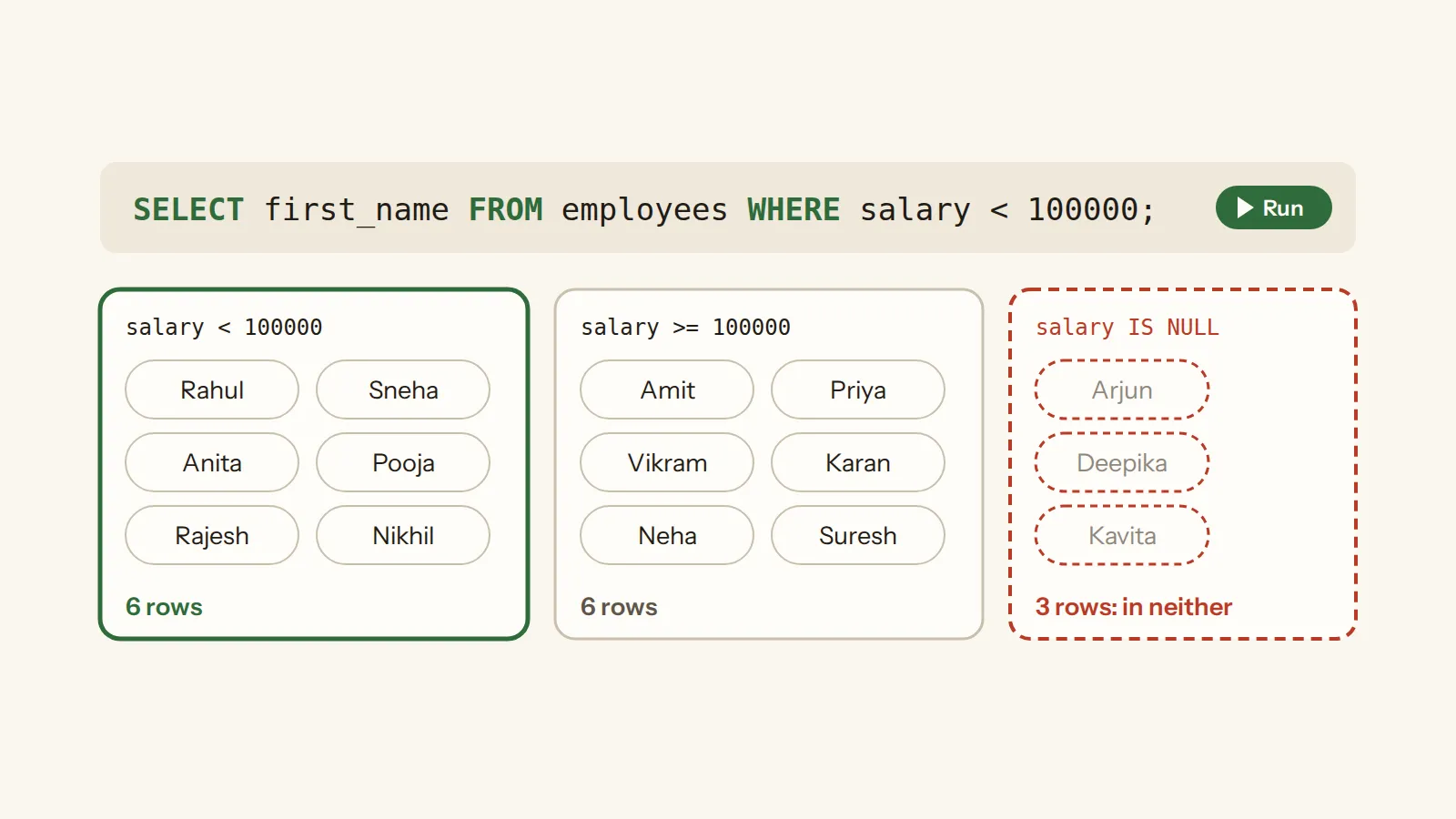
- The one idea: WHERE keeps a row only on a clear yes
- The table you are reading
- Comparisons, and the rows in neither answer
- Looking for the empty cells: IS NULL
- NOT does not bring them back
- AND, OR, and the brackets
- Two shorthands: IN and BETWEEN
- Patterns: LIKE
- Back to the question: keep the empty cells on purpose
- Your turn
- Test yourself
In this lesson · 11 parts
They were using Microsoft Access 2010, and their filter was a pattern test with NOT in front of it: keep every record whose field does not
have an R anywhere in it. Access writes "any run of characters" in a pattern as a star, so their pattern was '*R*'. SQLite,
the database that runs every example on this page, uses a percent sign for the same thing, so here it would be '%R%'. Their
fix was to ask for the empty cells by name, and they wanted to know why that extra test was needed.
Below is the same kind of query on a small table of employees. Its manager_id column holds the emp_id of each
person's manager, and Amit's emp_id is 1. The query asks for everyone who does not report to Amit.
Run it before you read on.
6 rows. Three people report to Amit: Priya, Anita and Deepika. That leaves 12 of the 15 who do not, and the query found
6 of them. The other six, Amit among them, have an empty manager_id, because they report to nobody. The query ran without
an error, and nothing on the screen says six rows are missing. By the end of this page you will know why, and you will have written the
fix yourself.
The one idea: WHERE keeps a row only on a clear yes
WHERE comes after FROM and holds a test, and each row is kept or dropped by it. Before it decides, SQLite turns the result of the test into true or false: a zero counts as false, any other value counts as true, and NULL stays NULL.
So a test has three possible answers, not two. True keeps the row, and false drops it. NULL, the answer a test gives when the cell it looks at is empty, is not true, so it drops the row as well.
Picture a guard at a door who asks every row one question and lets it in only on a clear yes. A no stays outside. So does a row that has no answer to give, because the cell the question is about is empty, and the guard never mentions that it turned that row away.
The table you are reading
Every SQL lesson here queries the same small company. These are the four columns this page tests.
15 rows. NULL marks an empty cell. Six people have NULL in manager_id: Amit, Rahul, Sneha, Vikram, Karan
and Neha report to nobody. Three have NULL in salary: Arjun, Deepika and Kavita. Those nine cells are what this page is
about.
Comparisons, and the rows in neither answer
A comparison tests two values with =, != (not equal), <, <=,
> or >=. Here is everyone who earns more than 100,000.
6 rows: Amit, Priya, Vikram, Karan, Neha and Suresh.
Now the opposite: everyone who earns 100,000 or less. The table has 15 rows and 6 were in the first answer, so guess how many this one returns before you run it.
6 rows again. 6 and 6 make 12, and three people are in neither answer: Arjun, Deepika and Kavita, the three with no salary on file.
To see why, put the test itself in the column list. SQLite writes true as 1 and false as 0.
15 rows, and the new column holds three kinds of answer: 1 where the salary is over 100,000, 0 where it is not, and NULL for Arjun, Deepika and Kavita. A test on an empty cell does not answer yes or no. It answers NULL, and WHERE keeps only the 1s.
This is what people call three-valued logic: true, false and unknown, with NULL standing for unknown. A test against an unknown value has no answer, so it can never be true, and the only way to keep the empty cells on purpose is to ask for them with IS NULL, which comes next.
A sort treats NULL differently. In the SELECT lesson, ORDER BY salary put the empty salaries first, because when SQLite
sorts, it counts NULL as smaller than any other value. A test does not.
How many rows does WHERE salary < 80000 return on this table?
An ascending sort puts NULL before every other value, but a comparison with NULL answers NULL, not true, so WHERE keeps only Anita's 78000.
Looking for the empty cells: IS NULL
The first thing most people try is an equals sign, and it looks right: WHERE salary = NULL. Try that version first, and guess
what comes back before you run it.
Nothing, and no error. salary = NULL is a comparison like any other, so on every row it answers NULL, and
WHERE keeps none of them.
Now ask with IS.
3 rows: Arjun, Deepika and Kavita.
IS works like =, and IS NOT like !=, with one difference: when there is a NULL on either side, IS still gives a
plain yes or no. Two NULLs are the same to IS, and NULL against a value is a no. An IS test never answers NULL, so WHERE can use it.
That is also the answer to a question many people ask at this point: why it has to be IS NULL, and not = NULL. An empty cell
holds no value, so = has nothing to compare against. Use IS NULL to find the empty cells, and IS NOT NULL to find the filled
ones.
What does WHERE salary != NULL return on this table?
!= NULL is a comparison with NULL, so it answers NULL on every row and WHERE keeps none of them. The test for a cell that has a value is IS NOT NULL.
NOT does not bring them back
When a test drops the wrong rows, putting NOT in front of it looks like a fix. Here is NOT (salary > 100000), which keeps
the salaries that are not more than 100,000.
6 rows, the same six as salary <= 100000. Arjun, Deepika and Kavita are missing again.
That is the Reddit asker's problem. Their test had a NOT in it, and on an empty field it still had no answer to give. Almost anything you do with a NULL gives NULL back: add a number to it, test it against a pattern, or put NOT in front of it. Check all three.
One row, and all three answers in it are NULL. NOT turns 1 into 0 and 0 into 1, and it leaves NULL as NULL, so flipping a test never brings an empty cell back.
This is not only SQLite. Adding anything to NULL gives NULL in SQLite, PostgreSQL, Oracle, Informix, DB2 and MS-SQL alike. Not every NULL case is that settled: the SQL standards leave some of them unclear.
AND, OR, and the brackets
A WHERE can hold several tests. AND needs both of them to be true, and OR needs either. With both in one WHERE, the order they are read in matters, and whether you need brackets is one of the oldest questions about it.
Here is that question on this table: the people in department 1 whose name starts with A or P. First without brackets.
4 rows, and one of them is wrong: Pooja is in department 2. SQLite read the test as
(dept_id = 1 AND first_name LIKE 'A%') OR first_name LIKE 'P%', so every name starting with P came in, from any department.
Without brackets, SQLite reads AND before OR, so the AND took only the test next to it. Brackets are how you choose the grouping yourself.
3 rows: Amit, Priya and Anita, all in department 1.
How does SQLite read WHERE dept_id = 6 OR dept_id = 4 AND salary > 100000?
AND binds more tightly than OR, so SQLite reads dept_id = 4 AND salary > 100000 as one test first, and every row of department 6 comes in whatever its salary.
Two shorthands: IN and BETWEEN
Several ORs on one column have a shorter form. IN takes a list of values, or a query, in brackets, and a row matches when its value is in the list.
4 rows: Rahul and Pooja from department 2, Vikram and Suresh from department 4.
NOT IN keeps the rows whose value is not in the list, and the empty cells catch it out too. You can check your answer in the SQL scratchpad.
How many rows does WHERE manager_id NOT IN (1, 7) return?
Nine people have a manager_id, and five of them have 1 or 7, which leaves 4. The six with an empty manager_id give no answer, so WHERE drops them too.
BETWEEN is the shorthand for a range: x BETWEEN y AND z means the same as x >= y AND x <= z. So both ends
are in.
6 rows, and Suresh's 110000 is one of them: the top end is included.
Patterns: LIKE
LIKE tests text against a pattern. In a pattern, % stands for any run of characters, none at all included, and
_ for exactly one character. Access writes the first of those as a star, which is why the Reddit query had
'*R*'.
3 rows: Amit, Anita and Arjun. The pattern has a small a and the names start with a capital A, and they still match, because SQLite's LIKE ignores the difference between capital and small letters. Out of the box it does that only for the plain English letters A to Z.
2 rows: Priya and Arjun, the names with r as their second letter.
NOT LIKE keeps what does not match. Here it is on first_name, which has no empty cells in this table.
8 rows. Change NOT LIKE to LIKE and run it again, and you get the other 7. 8 and 7 make all 15, because no first name is empty. A column with empty cells would not add up like this, and that is what the Reddit asker ran into.
Back to the question: keep the empty cells on purpose
The asker's own fix was to ask for the empty cells by name: an IS NULL test, joined with OR to their pattern test. When one side of an OR is true, the OR is true, even if the other side is NULL. On a row with an empty cell, IS NULL is true, so the whole test is true and the row stays. Here is the same fix for everyone who does not report to Amit.
12 rows: the six from the top of the page, and the six who report to nobody, Amit among them.
Your turn
There are five tasks below, all on the same table. Write the query, run it, and the page tells you how it is wrong: too many rows, too few, or the right number with the wrong ones in it. The order of the rows does not matter in these five.
employees: emp_id · first_name · last_name · email · hire_date · dept_id · manager_id · salary
All five. You used a list, a test for empty cells, a range and brackets, and you kept the empty cells on purpose.
Test yourself
salary > 100000 returns 6 rows and salary <= 100000 returns 6. Where are the other 3 of the 15?
WHERE keeps a row only when its test is true. On an empty salary both tests answer NULL, so those three rows are in neither result.
Which WHERE keeps everyone who earns less than 100,000, and the people with no salary on file too?
On an empty salary, both salary < 100000 and NOT (salary >= 100000) answer NULL, so WHERE drops the row. IS NULL is true there, and OR is true when either side is true.
Done. This lesson is ticked off on the path, and the questions you answered are now in your review deck.
query
A question put to the database in SQL; a SELECT is the kind that only reads, since "A SELECT statement does not make any changes to the database."
Source: sqlite.org ↗ · checked 13 Oct 2026
table
A named set of rows that all have the same columns; CREATE TABLE "is used to create a new table in an SQLite database" and names "each column in the table".
Source: sqlite.org ↗ · checked 13 Oct 2026
column
One named field that every row of a table has; a column definition "consists of the name of the column, optionally followed by the declared type of the column".
Source: sqlite.org ↗ · checked 13 Oct 2026
row
One record of a table or of a result; "The result of a SELECT is zero or more rows of data where each row has a fixed number of columns."
Source: sqlite.org ↗ · checked 13 Oct 2026
FROM
The clause that names the table or tables the query reads; "the data on which a simple SELECT query operates comes from the one or more tables or subqueries … specified following the FROM keyword".
Source: sqlite.org ↗ · checked 13 Oct 2026
NULL
A missing value, not zero and not an empty string; in comparisons it "is considered less than any other value (including another value with storage class NULL)".
Source: sqlite.org ↗ · checked 13 Oct 2026
clause
One part of a query that does one job; a simple SELECT runs "FROM clause processing", then "WHERE clause processing", then the result columns, then ORDER BY and LIMIT.
Source: sqlite.org ↗ · checked 13 Oct 2026
comparison
A test between two values with =, !=, <, > and the like; it answers true or false, and NULL when either side is empty.
Source: sqlite.org ↗ · checked 13 Oct 2026
WHERE
The clause that keeps only the rows whose test comes out true; a row whose test is false, or unknown because a cell is empty, is dropped without a message.
Source: sqlite.org ↗ · checked 13 Oct 2026
ORDER BY
The clause that decides the order of the rows; without it "the order in which the rows are returned is undefined". ASC is the default and NULLs come first in it.
Source: sqlite.org ↗ · checked 13 Oct 2026
LIMIT
The clause that keeps only the first N rows of the sorted result; when there are fewer than N rows, all of them come back.
Source: sqlite.org ↗ · checked 13 Oct 2026